Free download
The free reseller spreadsheet that tracks profit, not sales.
Every reseller template on Etsy computes price minus fees and calls it a day. This one prices the six costs your platform dashboard hides — COGS, shipping you ate, supplies, your time, returns, mileage — and rolls it all into a monthly P&L you could hand an accountant.
Built for eBay, Poshmark, Mercari, Depop, Whatnot, and Amazon sellers. Works in Excel and Google Sheets. No macros, no add-ons, nothing to maintain except two fee cells about once a year.
What one sale actually looks like
This is the worked example on the sheet's Walkthrough tab — live formulas, current fee schedules (verified July 2026).
| Line | Amount | |
|---|---|---|
| Sale price (thrifted fleece, eBay) | $24.99 | |
| eBay fee (13.6% of price + shipping, + $0.40 order fee) | −$4.61 | the only cost your dashboard charges |
| What the dashboard calls profit | $20.38 | |
| COGS | −$6.50 | hidden cost 1 |
| Shipping you ate (label − buyer-paid) | −$0.81 | hidden cost 2 |
| Supplies | −$0.65 | hidden cost 3 |
| Your time (15 min at $15/hr) | −$3.75 | hidden cost 4 |
| Return reserve (3%) | −$0.75 | hidden cost 5 |
| What you actually kept | $7.92 | 39% of what the dashboard claimed |

The sheet shows both numbers side by side on every sale — and the Dashboard tab totals the gap: what your dashboards overstated this year, in dollars. The method is written up here.
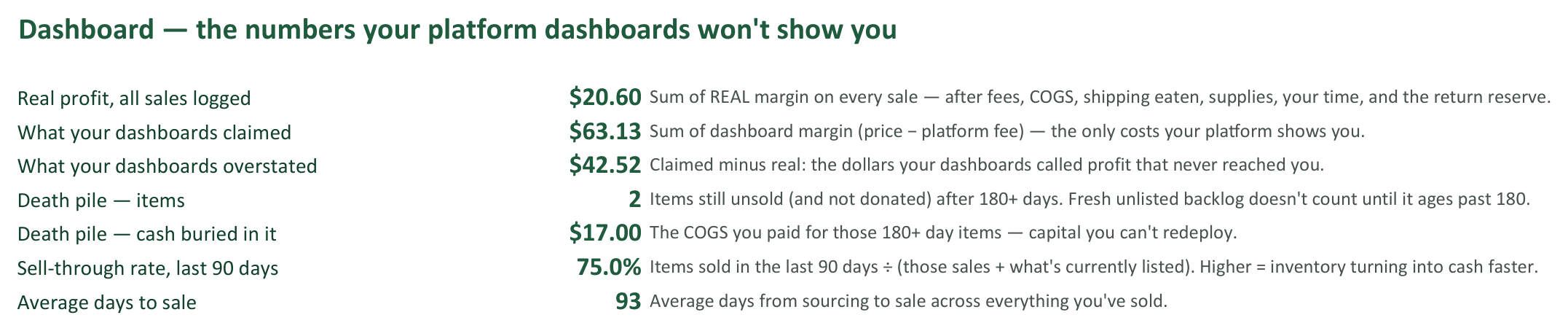
What's inside — eight tabs
- Start Here. One-minute setup, the daily workflow, and how to read your results. The sheet opens here.
- Settings. Your hourly rate, return reserve %, supplies cost, and tax-reserve % — the assumptions the whole sheet runs on.
- Inventory Log. One row per item: pre-printed stable SKU, item description, source, purchase price (COGS), status, days held, and 90/180/365 aging flags. Your death pile gets counted, not ignored.
- Sales Log. Enter the sale, get both margins: the "dashboard margin" your platform shows, and the real margin after COGS, shipping you ate, supplies, your time, and a return reserve. Fees compute automatically per platform, and a mistyped SKU flags CHECK SKU instead of silently counting $0 cost.
- Dashboard. Real margin by platform (where to list), real margin by source (where to source), 90-day sell-through, average days to sale, and the death-pile counter — items and dollars — each with a one-line definition.
- Monthly P&L. Twelve months, auto-rolled from the Sales Log: gross sales → fees, COGS, shipping, supplies, mileage → gross profit → tax reserve → profit after tax reserve.
- Fees. Every platform fee constant in one reference tab, with verification dates. When a platform changes its schedule, you update two cells — nothing else.
- Walkthrough. A filled-in example — five items bought, three sold — running on the same live formulas, so you can poke at it. Your real logs start clean.
Get the tracker
Free. Enter your email and the download link appears — plus one email a week on the ops-and-finance side of reselling. Unsubscribe anytime; the sheet is yours either way.
Excel opens it directly. Google Sheets: File → Import → Upload — every formula carries over.
Reseller CFO is a publication, not an advisory service. The tax-reserve line in the P&L is a savings placeholder, not tax advice. Related reading: pricing for profit and the math on returns.
Put the workbook to work with the SKU and bin setup guide and the sell-through formula.